
ProLiant DL320 Setup and Installation Guide

D-4 Compaq ProLiant DL320 Setup and Installation Guide
Compaq Confidential – Need to Know Required
Writer: Gilbert Saldivar Project: Compaq ProLiant DL320 Setup and Installation Guide Comments:
Part Number: 203836-001 File Name: l-appd Status Indicators and Switches.doc Last Saved On: 8/22/00 7:03 PM
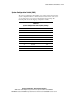
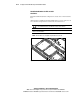
Internal LED Indicators
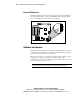
The ProLiant DL320 system board contains an internal power status LED for
use during troubleshooting operations. This LED indicates whether adequate
power is available to the system from the power supply.
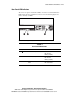
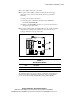
Figure D-3. Locating the power status LED
Switches and Jumpers
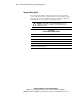
The ProLiant DL320 system board contains two switchbanks that may need to
be modified to set configuration or to trigger special functions. These switches
can cause problems if they are not correctly set.
When you add or remove a component or change a security feature, you must
reconfigure the computer to recognize these changes. If the system
configuration is incorrect, your computer may not work properly, and you may
receive error messages on the screen.
IMPORTANT: Reserved switches are provided for use by Compaq authorized service
providers only and should not be changed from the indicated default settings.