
ProLiant DL320 Setup and Installation Guide

Status Indicators and Switches D-3
Compaq Confidential – Need to Know Required
Writer: Gilbert Saldivar Project: Compaq ProLiant DL320 Setup and Installation Guide Comments:
Part Number: 203836-001 File Name: l-appd Status Indicators and Switches.doc Last Saved On: 8/22/00 7:03 PM
Rear Panel LED Indicators
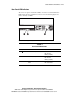
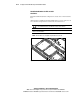
The server rear panel contains three LEDs: one for the rear unit identification
LED switch and two for the RJ-45 connectors. Use the following figure and
table to identify each LED.
21 3
Figure D-2. Identifying the rear panel LED indicators
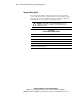
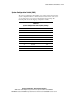
Table D-2
Rear Panel LED Indicators
Location LED Status
NIC 2 link/activity On = Link
Off = No Link
Blinking = Activity
NIC 1 link/activity On = Link
Off = No Link
Blinking = Activity
Rear unit identification LED
switch
Blue = activated
Off = deactivated