
ProLiant DL320 Setup and Installation Guide

Server Error Messages C-9
Compaq Confidential – Need to Know Required
Writer: Gilbert Saldivar Project: Compaq ProLiant DL320 Setup and Installation Guide Comments:
Part Number: 203836-001 File Name: k-appc Server Error Messages.doc Last Saved On: 8/1/00 3:58 PM
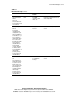
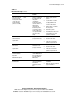
Table C-1
POST Error Messages
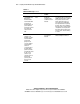
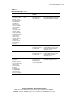
continued
Error Code Audible Beeps Probable Source of
Problem
Action
1781-Disk 1 Failure
The drive is not
installed correctly or
has failed. Make
sure that any
jumpers are set
correctly, and that
power and drive
cables are
connected, both to
the drive and the
system board. Also
verify that the cables
are the correct
cables for your
computer model. If
this message
persists, your PC
may need to be
serviced.
None Hard drive/format
error detected.
Run Compaq Diagnostics. Replace
the failed assembly as instructed.
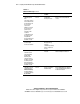
1790-Disk 0 Error None A hard drive error or
wrong drive type has
been detected.
Run the server setup utility and
Compaq Diagnostics, and correct.
Replace the failed assembly, if
instructed to do so.
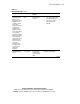
1790-Disk 1 Error None A hard drive error or
wrong drive type has
been detected.
Run the server setup utility and
Compaq Diagnostics, and correct.
Replace failed assembly, if
instructed to do so.
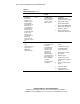
1801-Microcode
Patch Error
Missing or Invalid
Processor Microcode
Patch. Please
contact Compaq
Computer
Corporation for a
new ROM BIOS to
support the new
Processor Stepping.
None The newly installed
processor is not
supported by the
current system ROM.
Upgrade the system ROM or
reinstall the original processor.