
ProLiant DL320 Setup and Installation Guide

Server Error Messages C-7
Compaq Confidential – Need to Know Required
Writer: Gilbert Saldivar Project: Compaq ProLiant DL320 Setup and Installation Guide Comments:
Part Number: 203836-001 File Name: k-appc Server Error Messages.doc Last Saved On: 8/1/00 3:58 PM
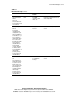
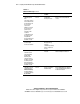
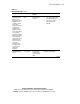
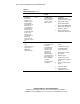
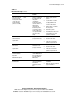
Table C-1
POST Error Messages
continued
Error Code Audible Beeps Probable Source of
Problem
Action
807-The password
has been cleared.
Please power off and
restore the clear
password switch
(switch 1 on SW2)
None Switch 1 on SW2 has
been turned on and
the system
configuration
password has been
cleared. Switch 1 on
SW2 must be
returned to the
default off position
for normal operation
and to enable you to
set a password with
the server setup
utility.
1. Remove power from the
system.
2. Locate switch 1 on SW2.
See Appendix D for the
location of this switch.
3. Return switch 1 on SW2 to
the off position.
4. Restart the system.
5. Press F9,and use the server
setup utility to set a new
password, if desired.
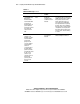
1611-Critical Fan
Failure Detected,
system fan X
None A required fan is not
properly functioning.
1. Check the fans.
2. Reseat the fan cable.
3. If this does not solve the
problem, replace the fan.
1611-Critical Fan
Not Present,
system fan X
None A required fan is not
installed or is not
properly connected.
1. Check the fans.
2. Reseat the fan cable.
3. If this does not solve the
problem, replace the fan.
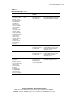
1704-Unsupported
Virtual Mode Disk
Operation
DOS Driver Required
None The current media in
the CD-ROM/diskette
drive assembly does
not support virtual
DMA service.
Verify the media.
1705-Locked SCSI
Bus Detected
None A SCSI controller
cannot communicate
with devices
attached to a SCSI
bus.
1. Verify the SCSI cable
installation.
2. Make sure the SCSI cable has
proper termination.
continued