
ProLiant DL320 Setup and Installation Guide

C-2 Compaq ProLiant DL320 Setup and Installation Guide
Compaq Confidential – Need to Know Required
Writer: Gilbert Saldivar Project: Compaq ProLiant DL320 Setup and Installation Guide Comments:
Part Number: 203836-001 File Name: k-appc Server Error Messages.doc Last Saved On: 8/1/00 3:58 PM
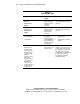
Table C-1
POST Error Messages
Error Code Audible Beeps Probable Source of
Problem
Action
ECC Single Bit Error
Detected in
DIMM/SIMM pair:
DIMM X
None A memory module
failure generated a
single-bit error that
could not be
corrected.
Run Compaq Diagnostics, and
replace failed memory module as
instructed.
ECC Multiple Bit
Error Detected in
DIMM/SIMM pair:
DIMM X
None A memory module
failure generated a
multiple-bit error
that could not be
corrected.
Run Compaq Diagnostics, and
replace failed memory module as
instructed.
Fixed Disk Parameter
Table or BIOS Error
System Halted
None An error occurred
while trying to
communicate with
the CD-ROM/diskette
drive assembly. This
assembly may not be
seated properly.
1. Reseat the CD-ROM/diskette
drive assembly.
2. Verify the media currently in
the drive.
101-Option ROM
Checksum Error
An add-in card in
your system is not
working correctly. If
you have recently
added new
hardware, remove it
and see if the
problem remains. If
this message goes
away after you
remove your new
hardware, there may
be a problem with
the add-in card.
1 long, 1 short An expansion board
in your system is not
working correctly.
If you have recently added new
hardware, remove it and see if the
problem remains. If this message
goes away after you remove your
new hardware, there may be a
problem with the expansion board.
Review the expansion board
documentation, and then try
reinstalling the board.
continued