
ProLiant DL320 Setup and Installation Guide

Server Configuration and Utilities 6-7
Compaq Confidential – Need to Know Required
Writer: Gilbert Saldivar Project: Compaq ProLiant DL320 Setup and Installation Guide Comments:
Part Number: 203836-001 File Name: g-ch6 Server Configuration and Utilities.doc Last Saved On: 8/24/00 6:07 PM
SmartStart and Support Software CD
The SmartStart and Support Software CD is used to load the system software,
thereby achieving a well-integrated server and ensuring maximum
dependability and supportability. The SmartStart CD contains diagnostic
utilities and ROMPaq tools.
IMPORTANT: Do not use the SmartStart and Support Software CD for loading system
software if you purchased your system with a factory-installed operating system. Refer to
the Compaq Factory-Installed Operating System Software User Guide for software
installation guidelines.
IMPORTANT: You must install an optional CD-ROM/diskette drive assembly in order to
use the SmartStart and Support Software CD.
Install the SmartStart and Support Software CD after you have configured
your primary operating system. Next, follow these steps:
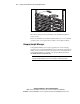
1. With your server powered up, press the CD eject button to open the
CD-ROM tray.
2. Locate the SmartStart and Support Software CD in the Server Setup and
Management pack.
3. Insert the SmartStart and Support Software CD in the CD-ROM drive,
and restart the system.
NOTE: Handle the CD by its edges, not by its flat surfaces.