
ProLiant DL320 Setup and Installation Guide

5-2 Compaq ProLiant DL320 Setup and Installation Guide
Compaq Confidential – Need to Know Required
Writer: Gilbert Saldivar Project: Compaq ProLiant DL320 Setup and Installation Guide Comments:
Part Number: 203836-001 File Name: f-ch5 Cabling Guidelines.doc Last Saved On: 8/22/00 7:57 PM
Internal Cabling for Storage Devices
Internal storage devices in the ProLiant DL320 server require minimum
cabling, as described in the following paragraphs.
ATA Hard Drives
The shipping configuration for your ProLiant DL320 server for ATA hard
drives already contains the internal cabling required for operating internal
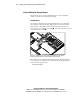
ATA hard drives. The ATA module on the system board connects to the
Device 0 drive via the ATA Device 0 Cable
and connects the Device 1 drive
via the ATA Device 1 Cable
.
2
1
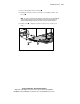
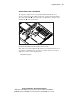
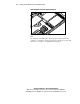
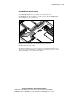
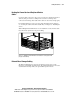
Figure 5-1. ATA drives connected properly to the ATA module on the system
board (center wall and PCI riser board assembly removed for clarity)
These cables are not included in SCSI models of the ProLiant DL320 server.
You can purchase an ATA hard drive option kit from a Compaq authorized
reseller via the Compaq website:
http://www.compaq.com