
ProLiant DL320 Setup and Installation Guide

4-20 Compaq ProLiant DL320 Setup and Installation Guide
Compaq Confidential – Need to Know Required
Writer: Gilbert Saldivar Project: Compaq ProLiant DL320 Setup and Installation Guide Comments:
Part Number: 203836-001 File Name: e-ch4 Installing the Server.doc Last Saved On: 8/23/00 4:07 PM
Removing the Server from the Rack
You may need to remove the server from the rack for service purposes or to
install hardware options.
NOTE: If you install the rack management solution option (ball-bearing slide rails and a
cable management system), you can perform many hardware procedures without
removing the server from the rack. For more information, see “Other Options” in
Chapter 3, “Installing Hardware Options.”
Use the following procedures to remove the server from the rack:
1. If you intend to install hardware options, back up your server data.
2. Shut down the operating system as directed in your operating system
instructions.
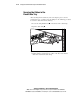
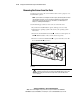
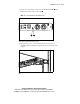
3. Press the front unit identification switch on the server front panel. An
LED
illuminates blue on the server front and rear panels.
4. Press the server Power On/Off switch to power down the server. The
Power On/Off LED
deactivates.
2 4
3
1
Figure 4-14. Activating the front unit identification LED and powering down
the server
WARNING: The system power in the ProLiant DL320 server does not
completely shut off from the front panel Power On/Off switch. Portions of the
power supply and some internal circuitry remain active until AC power is
removed.