
ProLiant DL320 Setup and Installation Guide

Installing the Server 4-15
Compaq Confidential – Need to Know Required
Writer: Gilbert Saldivar Project: Compaq ProLiant DL320 Setup and Installation Guide Comments:
Part Number: 203836-001 File Name: e-ch4 Installing the Server.doc Last Saved On: 8/23/00 4:07 PM
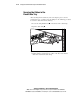
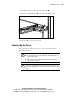
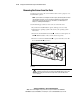
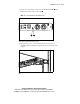
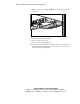
4. After all the cables are routed, close the cable clamp .
5. Tighten the clamp thumbscrews to hold the cable clamp in place.
1
1
2
2
Figure 4-12. Closing the cable clamp on routed cables
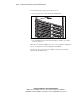
6. Route the cables to the side of the rack.
Powering Up the Server
After connecting the cables to the server, you are ready to power on the
ProLiant DL320 server.
WARNING: To reduce the risk of electric shock or damage to the equipment:
■ Do not disable the power cord grounding plug. The grounding plug is an
important safety feature.
■ Plug the power cord into a grounded (earthed) electrical outlet that is
easily accessible at all times.
WARNING: Do not place anything on power cords or cables. Arrange the cords
so that no one can accidentally step on or trip over them. Do not pull on a cord
or cable. When unplugging the cord from the electrical outlet, grasp the cord by
the plug.