
ProLiant DL320 Setup and Installation Guide

4-14 Compaq ProLiant DL320 Setup and Installation Guide
Compaq Confidential – Need to Know Required
Writer: Gilbert Saldivar Project: Compaq ProLiant DL320 Setup and Installation Guide Comments:
Part Number: 203836-001 File Name: e-ch4 Installing the Server.doc Last Saved On: 8/23/00 4:07 PM
Securing the Cables in the
Fixed Cable Tray
After attaching the fixed cable tray and connecting the power cord and
peripheral devices, you must secure all cabling. Use the following procedures
to secure the cables in the fixed cable tray:
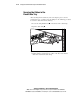
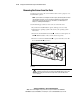
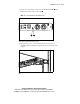
1. Loosen the clamp thumbscrews on both sides of the cable clamp.
2. Open the cable clamp .
1
1
2
2
Figure 4-11. Opening the cable clamp (cables removed for clarity)
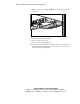
3. Starting with the peripheral device cables on the left, route all of the
cables and cords into the cable clamp.