
ProLiant DL320 Setup and Installation Guide

Installing the Server 4-13
Compaq Confidential – Need to Know Required
Writer: Gilbert Saldivar Project: Compaq ProLiant DL320 Setup and Installation Guide Comments:
Part Number: 203836-001 File Name: e-ch4 Installing the Server.doc Last Saved On: 8/23/00 4:07 PM
CAUTION: Always follow the cabling order for the ProLiant DL320 server. Using
an improper cabling sequence can result in electrical damage to peripheral
devices.
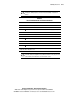
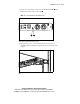
Table 4-1
Rear Panel Connectors and Connection Order
Location Connector
Expansion slot
RJ-45 Fast Ethernet connector for NIC 2
RJ-45 Fast Ethernet connector for NIC 1 (supports PXE)
Mouse connector
Serial connector
Video connector
Keyboard connector
USB 1 connector
USB 2 connector
Power connector
Note: The location numbers in this table correspond to the connection order for the
peripheral cables and power cord.
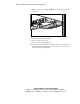
CAUTION: Do not route the power cord in a place where it can be walked on or
pinched by items placed against it. Pay particular attention to the plug, electrical
outlet, and the point at which the cord exits from the server.