
ProLiant DL320 Server Maintenance and Service Guide
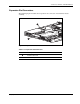
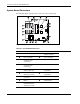
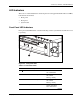

Connectors, Switches, and LED Indicators
4-8 Compaq ProLiant DL320 Server Maintenance and Service Guide
COMPAQ CONFIDENTIAL Codename: DarkStar-T Part Number: 203834-003 Last Saved On: 12/28/01 9:32 AM
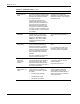
Table 4-7: Front Panel LEDs continued
Item LED Description Status
Drive activity Green = Activity
Off = No activity
Power On/Off Green = Power on
Amber = Power good
Off = Power off
CD-ROM/DVD-ROM drive
activity
Green = Activity
Off = No activity
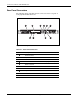
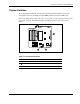
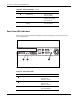
Rear Panel LED Indicators
The server rear panel contains three LEDs that allow monitoring of network activity and
server identification.
21 3
Figure 4-6: Rear panel LEDs
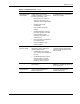
Table 4-8: Rear Panel LEDs
Item Description Status
NIC 2 link/activity On = Link
Off = No link
Blinking = Activity
NIC 1 link/activity On = Link
Off = No link
Blinking = Activity
Rear unit identification Blue = Activated
Off = Deactivated