
ProLiant DL320 Server Maintenance and Service Guide

Connectors, Switches, and LED Indicators
Compaq ProLiant DL320 Server Maintenance and Service Guide 4-7
COMPAQ CONFIDENTIAL Codename: DarkStar-T Part Number: 203834-003 Last Saved On: 12/28/01 9:32 AM
LED Indicators
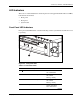
This section contains illustrations and descriptions for Compaq ProLiant DL320 server LEDs,
both internal and external:
• Front panel
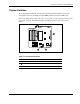
• Rear panel
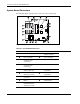
• System board
Front Panel LED Indicators
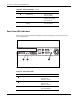
Front panel status LEDs allow constant monitoring of basic system functions while the server
is operating.
1
5
3
2
4
7
6
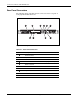
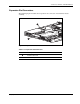
Figure 4-5: Front panel LEDs
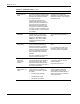
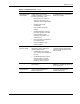
Table 4-7: Front Panel LEDs
Item LED Description Status
Front unit identification Blue = Activated
Off = Deactivated
NIC 2 link/activity Green = Link
Off = No link
Blinking = Activity
NIC 1 link/activity Green = Link
Off = No link
Blinking = Activity
System health Green = Good
Amber = Degraded
Red = Critical error
continued