
ProLiant DL320 Server Maintenance and Service Guide

Diagnostic Tools
Compaq ProLiant DL320 Maintenance and Survice Guide 3-3
COMPAQ CONFIDENTIAL Codename: DarkStar - T Part Number: 203834-003 Last Saved On: 12/21/01 12:59 PM
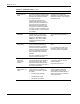
Table 3-1: Diagnostic Tools continued
Tool What it is How to run it
ROM-Based Setup
Utility (RBSU)
A utility used to configure the
hardware installed in or connected to
the server. Specifically, it can:
• Resolve resource conflicts in
areas such as memory, port
addresses, and interrupts (IRQs).
• Configure PCI boards
automatically.
• Provide switch and jumper
settings.
• Manage installation of memory,
processor upgrades, and mass
storage devices such as
hard drives, tape drives, and
diskette drives.
• Store configuration information in
nonvolatile memory.
• Assist in installation of an
operating system.
Run RBSU directly by pressing the
F9 key during POST.
Automatic Server
Recovery (ASR)
A tool that lets the server restart
automatically after a catastrophic
operating system failure.
• Available Recovery−software
error recovery and environmental
recovery
• Unattended Recovery−logs the
error information to the IML,
resets the server, and tries to
restart the operating system
This tool is a function of the
combined hardware and software
system through the RBSU. Set the
ASR to enable.
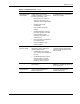
ROMPaq Utility A utility that upgrades the current
system ROM.
Run this utility from the
ROMPaq ™ diskette after powering
up the system unit.
SmartStart
Diskette Builder
A tool that creates a diskette version
of the Compaq SmartStart and
Software Support CD.
Run the diskette builder tool from
the Compaq SmartStart and
Software Support CD.