
ProLiant DL320 Server Maintenance and Service Guide

Diagnostic Tools
3-2 Compaq ProLiant DL320 Maintenance and Survice Guide
COMPAQ CONFIDENTIAL Codename: DarkStar - T Part Number: 203834-003 Last Saved On: 12/21/01 12:59 PM
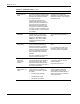
Table 3-1: Diagnostic Tools continued
Tool What it is How to run it
Compaq Survey
Utility
An online information-gathering agent
that runs on servers to collect critical
hardware and software information
from various sources.
If a significant change occurs
between data-gathering intervals,
previous information is marked and
the survey text file is overwritten to
reflect the latest configuration and
changes since the last configuration.
This utility provides a historical record
of change events for server hardware
and software.
Install the Survey Utility from
SmartStart, the Compaq Integration
Maintenance Utility, or the Compaq
Management CD.
Compaq
SmartStart
The intelligent way to set up your
Compaq server. Located on the
Compaq SmartStart and Software
Support CD, SmartStart includes
ROMPaq™ Utility, driver updates,
and assisted operating system
installations.
Use the information provided in the
Server Setup and Management
pack.
Array Diagnostics
Utility (ADU)
A Windows-based tool designed to
run on all Compaq systems that
support Compaq array controllers.
Two main functions of ADU are to
collect all possible information about
the array controllers in the system
and to generate a list of detected
problems.
This tool is available for all Compaq
servers covered by this guide.
Use the information provided in the
ADU.
For a complete list of ADU error
messages, refer to the Compaq
Servers Troubleshooting Guide.
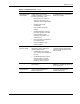
Drive Array
Advanced
Diagnostics
(DAAD)
A DOS-based tool for Compaq
servers with Smart Array controllers.
The predecessor to ADU, DAAD
collects information about the array
controllers in the system and offers a
list of detected problems.
For a list of Compaq servers still
supported by this tool, visit the
Compaq website:
http://www.compaq.com
Integrated
Management Log
(IML)
A log of system events such as
system failures or nonfatal error
conditions. View events in the IML
from within:
• Compaq Insight Manager
• Compaq Survey Utility
• OS-specific IML Utilities
The IML requires Compaq
operating system-dependent
drivers. Refer to the Compaq
SmartStart and Software Support
CD for instructions on installing the
appropriate drivers.
continued