
ProLiant DL320 Server Maintenance and Service Guide

Removal and Replacement Procedures
2-44 Compaq ProLiant 320 Server Maintenance and Service Guide
COMPAQ CONFIDENTIAL Codename: DarkStar-T Part Number: 203834-003 Last Saved On: 12/28/01 9:29 AM
System Board
CAUTION: The system board spare kit ships with two color-coded heat sinks. After replacing
your system board and reinstalling your processor, install the replacement heat sink that has
the same color as the original heat sink.
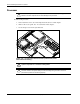
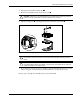
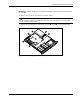
To remove the system board:
1. Power down the server. See “Powering Down the Server” in this chapter.
2. Remove the access panel. See “Access Panel” in this chapter.
3. Remove the PCI riser board assembly. See “PCI Riser Board Assembly” in this chapter.
4. Remove the center wall. See “Center Wall” in this chapter.
5. Remove the SCSI or ATA module. See “Single Channel Wide Ultra2 SCSI Controller
Module,” or “Ultra ATA/100 Controller Module” in this chapter.
6. Remove any DIMMs. See “Memory Modules” in this chapter.
7. Disconnect the fan 4 and fan 5 cables. See “System Fans” in this chapter.
8. Disconnect the power supply from the system board. See “Power Supply” in this chapter.
9. Disconnect the CD-ROM (DVD-ROM)/diskette drive assembly cable from the system
board. See “CD-ROM (DVD-ROM)/Diskette Drive Assembly Cable” in this chapter.
10. Remove the system battery. See “Battery” in this chapter.