
ProLiant DL320 Server Maintenance and Service Guide


Removal and Replacement Procedures
Compaq ProLiant 320 Server Maintenance and Service Guide 2-39
COMPAQ CONFIDENTIAL Codename: DarkStar-T Part Number: 203834-003 Last Saved On: 12/28/01 9:29 AM
Battery
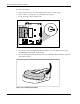
If the server no longer automatically displays the correct date and time, you may need to
replace the battery that provides power to the real-time clock. Under normal use, battery life
is 5 to 10 years. Replace used batteries with a Compaq 540-milliampere-hour lithium, 3V
replacement battery.
WARNING: This server contains either an internal lithium manganese dioxide, or a
vanadium pentoxide battery. There is risk of fire and burns if the battery pack is not
handled properly. To reduce the risk of personal injury:
• Do not attempt to recharge.
• Do not expose to temperatures higher than 60°C.
• Do not disassemble, crush, puncture, short external contacts, or dispose of in fire
or water.
• Replace only with the spare designated for this product.
CAUTION: Loss of BIOS settings occurs when the battery is removed. BIOS settings must be
reconfigured whenever the battery is replaced.
CAUTION: Batteries, battery packs, and accumulators should not be disposed of together
with general household waste. Use the public collection system or return used batteries to
your authorized partners or their agents for proper recycling and disposal.
IMPORTANT: Run the ROM-Based Setup Utility (RBSU) to configure the system after replacing the
battery. Refer to the server troubleshooting guide or setup and installation guide for more information.