
ProLiant DL320 Server Maintenance and Service Guide

Removal and Replacement Procedures
2-22 Compaq ProLiant 320 Server Maintenance and Service Guide
COMPAQ CONFIDENTIAL Codename: DarkStar-T Part Number: 203834-003 Last Saved On: 12/28/01 9:29 AM
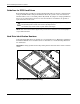
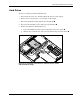
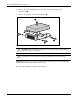
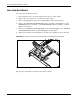
6. Remove the four 6-32 Phillips-head screws that secure the hard drive to the
hard drive tray
.
7. Remove the hard drive from the hard drive tray
.
2
1
1
1
1
Figure 2-16: Removing a hard drive from a hard drive tray
CAUTION: Review “Guidelines for Hard Drives” in this chapter to ensure proper jumper
settings and hard drive configuration.
CAUTION: When connecting the power cable to your hard drives, ensure that the connectors
are installed so that the red wire faces right when viewed from the front of the server.
IMPORTANT: Ensure that you install your hard drives with the data and power connectors along the
bottom of the tray, facing away from the front vent holes.
Reverse steps 1 through 6 to replace the hard drive.