
ProLiant DL320 Server Maintenance and Service Guide

Removal and Replacement Procedures
2-20 Compaq ProLiant 320 Server Maintenance and Service Guide
COMPAQ CONFIDENTIAL Codename: DarkStar-T Part Number: 203834-003 Last Saved On: 12/28/01 9:29 AM
Guidelines for SCSI Hard Drives
Each SCSI hard drive installed in a Compaq ProLiant DL320 server must be configured with
a unique SCSI ID number. Unique identification allows the system to search for the lowest
numbered drive to use as a bootable partition. By default, the jumpers on Compaq SCSI hard
drives are set to ID 0 and may need to be reset when the drive is installed as an optional or
replacement drive in the server.
CAUTION: Installing unsupported hard drives may damage your system by consuming powe
r
and generating heat in excess of the server’s operating tolerance.
This condition may result in a loss of system and/or data integrity.
NOTE: Refer to the documentation shipped with your hard drive to determine how to set the jumpers
on your SCSI hard drives.
Hard Drive Identification Numbers
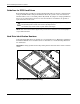
Compaq ProLiant DL320 servers include two 1-inch hard drive trays. Hard drives installed in
the ProLiant DL320 server are labeled as Device 0 and Device 1 in the following illustration
for clarification.
IMPORTANT: Always populate hard drive bays starting with the lowest ATA device number or SCSI ID
number.
0
1
Figure 2-14: ATA device numbers or recommended SCSI ID
numbers (drive cables removed for clarity)