
ProLiant DL320 Server Maintenance and Service Guide

Removal and Replacement Procedures
2-10 Compaq ProLiant 320 Server Maintenance and Service Guide
COMPAQ CONFIDENTIAL Codename: DarkStar-T Part Number: 203834-003 Last Saved On: 12/28/01 9:29 AM
To replace a DIMM on the system board:
IMPORTANT: A DIMM can be installed only one way. Be sure to match the key slots on the module
with the tabs on the memory slot. Push the module down into the slot until it is fully inserted and
properly seated.
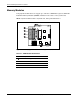
1. Identify the correct DIMM socket to populate. Refer to the illustration provided in this
section.
2. Open the DIMM socket latches if they are not already opened.
3. Align the key slot in the bottom edge of the DIMM with the tab in the expansion socket.
CAUTION: The system does not recognize improperly aligned or seated DIMMs.
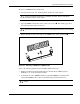
4. Insert the DIMM at the same angle as the DIMM socket on the system board . As the
DIMM enters the socket, the latches close
.
2
2
1
2
Figure 2-4: Installing a DIMM in a DIMM socket
CAUTION: Use only Compaq DIMMs. DIMMs from other sources can adversely affect data
integrity.
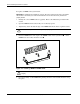
5. Press down firmly on the DIMM while pushing the latches inward until the latches snap
into place.