
ProLiant DL320 Server Maintenance and Service Guide

Removal and Replacement Procedures
Compaq ProLiant 320 Server Maintenance and Service Guide 2-9
COMPAQ CONFIDENTIAL Codename: DarkStar-T Part Number: 203834-003 Last Saved On: 12/28/01 9:29 AM
To remove a DIMM from the system board:
1. Power down the server. See “Powering Down the Server” in this chapter.
CAUTION: Electrostatic discharge can damage electronic components. Ensure that you are
properly grounded before beginning any installation procedure. Refer to “Electrostatic
Discharge Information” in this chapter.
2. Remove the access panel. See “Access Panel” in this chapter.
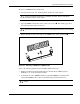
3. Open the DIMM socket latches on the socket to be serviced
. The module pops out of
the socket when the latches are released.
CAUTION: Remove DIMMs carefully in order to avoid bumping the controller module on the
system board. The module connector pins can be damaged if the module is moved suddenly.
4. Pull the module out at the same angle as the DIMM socket on the system board .
1
1
2
Figure 2-3: Removing a DIMM from a DIMM socket
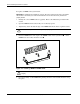
Observe the following guidelines when installing additional memory:
• Memory installed in the ProLiant DL320 server must be PC133-MHz registered
SDRAM, 3.3 V, 72 bits wide, ECC modules.
• To facilitate successive DIMM installations, install the DIMMs in sequential order,
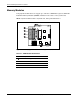
starting with DIMM socket 1. Refer to the illustration provided in this section.
CAUTION: Use only Compaq DIMMs. DIMMs from other sources can adversely affect data
integrity.