
Compaq ProLiant DL320 Ultra-Dense Server Deployment in Compaq Racks

Compaq ProLiant DL320 Ultra-Dense Server Deployment in Compaq Racks 8
13AS-0900A-WWEN
High Voltage – AC line voltage of 200 V to 240 V. With higher voltage levels, a server can use a
lower current and still meet its power requirements. Compaq recommends using a high-
voltage source to support high-volume deployments of ProLiant DL320 servers in a rack.
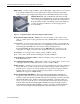
In-Rack Keyboard – The 1U Rack Keyboard Drawer and the
Internal Keyboard with Trackball are designed to work together to
save room in space-constrained rack-mount environments. The 1U
Keyboard Drawer requires only half the Compaq rack depth and
provides enough space behind it to mount a Compaq Server
Console Switch.
Figure 2. 1U Keyboard Drawer and Internal Keyboard with Trackball
Keyboard/Video/Mouse (KVM) – KVM refers to a keyboard cable, a video cable, a mouse
cable, or a switch. Some Compaq parts lists may refer to KVM switches as Server Console
Switches.
Local Console – A local console system does not use a network connection to interact with the
server. A local console system incorporates a set of KVM devices and can be in-rack or off-
rack. In this paper, in-rack local console refers to a flat panel display and a
keyboard/trackball in the same rack as the servers. Off-rack local console refers to any
combination of a display, a keyboard, and a pointing device located outside of the rack.
Low Voltage – Low voltage refers to AC line voltage of 100 V to 120 V.
N.A. – N.A. refers to North America including U.S., Canada, and Mexico.
Network Interface Controllers (NICs) – NICs are embedded on the system board of the
ProLiant DL320 server.
Power Distribution Unit (PDU) – A PDU can be a high- or low-voltage device. See the section
of this paper titled “Power Distribution Units ” for more details on PDUs.
Remote Console – A remote console is a server console system that uses a network connection to
interact with the server. This system allows any computer with appropriate software and
network access to control a server from anywhere across the globe. Compaq recommends
using the remote-console system for managing a large number of servers because it
eliminates the congestion of KVM cabling.
Remote Insight Lights-Out Edition – The Compaq Remote Insight Lights-Out Edition is
designed to provide remote access and control of Compaq ProLiant server products from
anywhere on the network with a standard web browser. Consequently, customers can deploy
a ProLiant DL320 in a true “headless” fashion with a minimum of only three cables per
server: one power cord for the server, one network cable for the LAN connection, and one
network cable for the Remote Insight Lights-Out Edition management LAN connection.
Using the Remote Insight Lights-Out Edition, customers can deploy 42 ProLiant DL320
servers in a 42U Compaq rack with significantly fewer cables than in a local console.