
Compaq ProLiant DL320 Ultra-Dense Server Deployment in Compaq Racks

Compaq ProLiant DL320 Ultra-Dense Server Deployment in Compaq Racks 35
13AS-0900A-WWEN
Sliding Rails and Cable Management Solution
Connect the cables to each device installed in the rack, working from the bottom to the top.
Beginning at the bottom of the rack, connect the cables to the bottom piece of equipment.
Connect and route the cables through the tension reel and cable rack bracket according to the
instructions in Compaq Sliding Rails and Cable Management Guide for the ProLiant DL320
Server. Connect the cables to the console switchbox. Connect the power cord to the PDU. Do not
connect the PDU to any power source until all equipment is fully deployed in the rack.
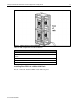
When the cables are properly connected and routed through the cable management system, the
rear door of the rack closes easily over the cables. If the rear door does not close easily, additional
space may be required. Install the rack extension or the bustle kit to provide more space for the
cables at the rear of the rack.
WARNING: To reduce the risk of electric shock or damage to the equipment:
• Unplug the power cord from the system.
• Do not disable the power-cord-grounding plug. The grounding plug is an important
safety feature.
• Plug the power cord into a grounded (earthed) electrical outlet that is easily accessible
at all times.
IMPORTANT: In 7000-series racks, route the power cables from the servers to the PDUs
through the gap in the rear of the rack rail.
Off-Rack Local Console
Use the in-rack local console procedure for the cable management system installed in the rack to
connect and route cables with an off-rack local console. However, with an off-rack console,
longer cables may be required to reach the console. See Table 11 earlier in this paper for
information on CPU-to-switchbox cables available from Compaq.
Remote Console Management
The remote console management system uses a CAT5 cable connected to the RJ45 connector in
the Remote Insight Lights-Out PCI board and the power cord. Route these cables through the
cable management system according to the instructions either in the Compaq ProLiant DL320
Setup and Installation Guide or the Compaq Sliding Rails and Cable Management Guide for the
ProLiant DL320 Server. Connect the power cord to the PDU and the CAT5 cable to the network
data line outlet.
Completing the Installation
Perform the following steps to complete the installation.
• Install side panels on the outsides of the end racks.
• Install the front and rear doors.
• Connect the PDUs to the power source.
• Power up the servers.