
Compaq ProLiant DL320 Ultra-Dense Server Deployment in Compaq Racks

Compaq ProLiant DL320 Ultra-Dense Server Deployment in Compaq Racks 26
13AS-0900A-WWEN
Rack Management Systems
Compaq recommends using either the Standard Fixed Rail Rack Management solution or the
Sliding Rail and Cable Management solution. The rack management solution installed in the rack
determines the position of the PDUs installed in the rack side panels. To determine the best rack
management solution, consider the service and upgrade demands of the servers deployed in the
rack.
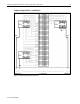
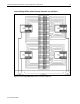
Standard Fixed Rail Rack Solution
The standard fixed rail rack solution works best in racks that require fast setup and deployment
for operation with servers that require few services or upgrades. The fixed rail solution is quick
and easy to install, allowing efficient deployment and setup of a full rack of servers.
The ProLiant DL320 server ships with a standard fixed rail rack kit designed for 29-inch deep
square-hole racks. The server rails are pre-installed on the sides of the ProLiant DL320 server,
and the rack rails are designed to snap securely in place in the rack without screws or nuts.
The ProLiant DL320 server includes a cable support bracket that works in conjunction with the
fixed cable management tray included with the standard fixed rail rack kit. The cable support
bracket and cable management tray route the cables to the right side of the rack (viewed from the
rear) and secure them in place in the cable management tray clamp. This solution keeps the cables
from sagging and tangling and allows proper air ventilation through the rack.
However, this solution does not allow in-rack servicing for any server installed in the rack. If a
server requires servicing, the cables must be disconnected and the server must be removed from
the rack. For detailed installation instructions for the fixed rail rack kit that ships with the server,
refer to the Compaq ProLiant DL320 Setup and Installation Guide.
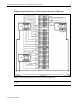
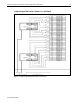
Sliding Rails and Cable Management Solution
The Sliding Rails and Cable Management Solution works best with a rack of servers that are
frequently serviced or upgraded. With this solution, a server can be powered down and serviced
without disconnecting the server cables or removing the server from the rack.
Like the standard fixed rail rack solution, the Sliding Rails and Cable Management Solution is
designed for 29-inch deep, square-hole racks. The sliding rack rails compress and snap securely
in place in the rack without screws or nuts.
The Sliding Rails and Cable Management Solution comes with a two-level cable management
tray that attaches directly onto the rear of the DL320 cable support bracket. The cable
management tray operates in conjunction with the cable rack bracket and tension reel. Together
these components secure and route the cables along the rear of the rack. This cable management
system not only prevents the cables from sagging and tangling, but it also allows proper air
ventilation through the rack while allowing the servers to be fully extended without disconnecting
any of the server cables.
The Sliding Rails and Cable Management Solution is conducive to in-rack servicing and provides
convenient access to the server cables and connectors. Refer to the Sliding Rails and Cable
Management Solution Guide for Compaq ProLiant DL360 and DL320 Servers included in the
rack option kit for complete installation instructions.