
Compaq ProLiant DL320 Ultra-Dense Server Deployment in Compaq Racks

Compaq ProLiant DL320 Ultra-Dense Server Deployment in Compaq Racks 15
13AS-0900A-WWEN
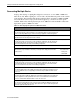
In-Rack Local Consoles
With an in-rack local console, all equipment, servers, switchboxes, keyboards, keyboard drawers,
and video displays are installed together in the same rack. One console switchbox can support up
to eight pieces of equipment.
Each server deployed in a fully populated rack with an in-rack local console management system
requires the following accessories for successful deployment and operation:
• Rack Rail kit (Standard Fixed Rail solution, Sliding Rail and cable management solution, or
Third Party Rack Cabinet solution)
• KVM server to console cables (3-ft cables for fixed rail solutions and 6-ft cables for sliding
rail solutions)
• One or two RJ45 cables for NIC 1 and NIC 2
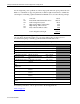
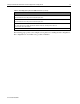
Table 12 outlines the number of devices that fully populate a 42- or 36U rack with an in-rack
local console.
Table 12. Device configuration for an in-rack local console
Device or Cable 42U Rack 36U Rack
ProLiant DL320 Servers 35 30
KVM Console Switches 5 4
Flat Panel Display 1 1
Keyboard with Trackball 1 1
Keyboard Tray 1 1
RJ45 cables 35/70 30/60
KVM server to console cables 40 30
Off-Rack Local Consoles
With an off-rack local console, certain components such as console switchboxes, keyboards, and
video displays do not populate space in the rack, but are located in close vicinity to the rack. With
an off-rack local console, the rack can be fully populated with servers. Cable lengths for
connecting servers to an off-rack local console vary depending on the location of the console.
Each server deployed in a fully populated rack with an off-rack console management system
requires the following accessories for successful deployment and operation:
• Rack Rail kit (standard fixed rail solution, Sliding Rail and Cable Management Solution, or
Third-Party Rack Cabinet solution)
• KVM server to console cables
• One or two RJ45 cables for NIC 1 and NIC 2