
Compaq ProLiant DL320 Service Update




Compaq ProLiant DL320 Service Update 9
Rev. 1.0 Page 9 of 17
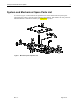
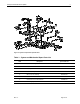
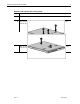
Remove and replace the access panel
Step Action
1.
Press and hold down the locking latches .
2.
Slide the access panel approximately 1.25 cm (0.5 inch) toward the rear of the unit
and lift the panel to remove it .
Reverse steps 1 through 2 to replace the access panel. When the locking latches snap
into place, the access panel is secure.