
Compaq ProLiant DL320 Service Update


Compaq ProLiant DL320 Service Update 15
Rev. 1.0 Page 15 of 17
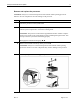
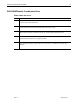
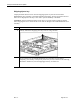
Remove and replace the DVD-ROM/combination drive
Step Action
1.
Remove the shipping/ejector key from the chassis if you have not already done so.
2.
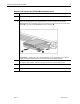
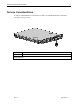
Insert the shipping/ejector key approximately 1.25 cm (0.5 inch) into the DVD-
ROM/diskette drive assembly ejector port on the lower right corner of the server front
panel to eject the DVD-ROM/diskette drive assembly .
CAUTION: To reduce the risk of thermal damage, do not operate the server without
either the DVD-ROM/diskette drive assembly or the bezel blank installed.
To replace the assembly, slide the assembly into the bay until it is fully seated.