
Compaq ProLiant DL320 Service Update



Compaq ProLiant DL320 Service Update 11
Rev. 1.0 Page 11 of 17
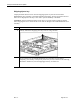
Remove and replace the processor
CAUTION: Always use a new thermal pad and a new heatsink when replacing processors.
Failure to use new components can cause damage to the processor.
Step Action
1.
Locate the processor on the system board.
2.
WARNING: To reduce the risk of personal injury from hot surfaces, allow the
internal system components to cool before touching them.
CAUTION: The processor socket must be populated at all times. Failure to replace
the processor results in the system failing to boot and halting during the POST. This
error prevents the system from functioning properly.
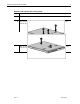
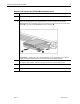
Disengage the heatsink retaining clip , .
3.
Remove the heatsink from the top of the processor .
CAUTION: Always use a new thermal pad and a new heatsink when replacing
processors. Failure to use new components may result in damage to the processor.
4.
Lift the ejecting lever to disengage the processor from the system board .