
HP ProLiant DL320 G6 Server Maintenance and Service Guide




Removal and replacement procedures 49
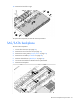
To replace the component, reverse the removal procedure.
Dedicated iLO 2 connector module
To remove the component:
1. Power down the server (on page 25).
2. Remove the server from the rack (on page 26).
3. Remove the access panel ("Access panel" on page 27).
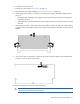
4. Remove the module.
To replace the component, reverse the removal procedure.
DIMMs
IMPORTANT: This server does not support mixing RDIMMs and UDIMMs. Attempting to mix
these two types causes the server to halt during BIOS initialization.
To identify the DIMMs installed in the server, see "DIMM identification (on page 76)."
To remove the component:
1. Power down the server (on page 25).
2. Remove the server from the rack (on page 26).
3. Remove the access panel ("Access panel" on page 27).
4. Remove the air baffle ("Air baffle" on page 28).
5. Open the DIMM slot latches.