
HP ProLiant DL320 G6 Server Maintenance and Service Guide




Removal and replacement procedures 41
10.
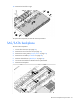
Remove the hard drive cage.
To replace the component, reverse the removal procedure.
SAS/SATA backplane
To remove the component:
1. Power down the server (on page 25).
2. Remove the server from the rack (on page 26).
3. Remove the access panel ("Access panel" on page 27).
4. Remove the air baffle ("Air baffle" on page 28).
5. Remove all hard drives ("Hard drive" on page 26).
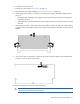
6. Disconnect the hard drive cables from the system board.
7. Remove the backplane.