
HP ProLiant DL320 G6 Server Maintenance and Service Guide





Removal and replacement procedures 32
4.
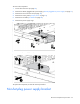
Remove the power supply from the server.
WARNING: To reduce the risk of electric shock or damage to the equipment, do not connect the
power cord to the power supply until the power supply is installed.
To replace the component:
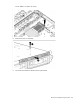
1. Install the power supply.
2. Connect the power cord to the power supply.
3. Connect the power cord to the power source.
4. Power up the server.
460-W pluggable AC power supply backplane
WARNING: To reduce the risk of personal injury from hot surfaces, allow the power supply or
power supply blank to cool before touching it.
CAUTION: To prevent improper cooling and thermal damage, do not operate the server unless
all bays are populated with either a component or a blank.