
HP ProLiant DL320s Server Maintenance and Service Guide

Server component identification 46
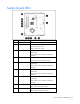
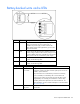
System board LEDs
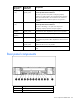
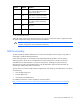
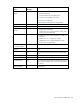
Item LED description Status
1 Reserved —
2 Overtemperature Amber = System has reached a cautionary or
critical temperature level.
Off = Temperature is OK.
3 Fan 1 Amber = One or more fans in this module
have failed.
Off = All fans in this module are operating
normally.
4 Processor Amber = Processor has failed.
Off = Processor is operating normally.
5 Fan 2 Amber = One or more fans in this module
have failed.
Off = All fans in this module are operating
normally.
6 Fan 3 Amber = One or more fans in this module
have failed.
Off = All fans in this module are operating
normally.
7 Fan 4 Amber = One or more fans in this module
have failed.
Off = All fans in this module are operating
normally.
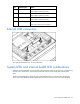
8 PPM Amber = PPM has failed.
Off = PPM is operating normally.
9 DIMM 4 Amber = DIMM has failed.
Off = DIMM is operating normally.