
HP ProLiant DL320s Server Maintenance and Service Guide

Server component identification 40
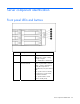
Item Description Status
3 NIC 1 link/activity LED Green = Network link exists.
Flashing green = Network link and
activity exist.
Off = No link to network exists.
If power is off, view the LEDs on
the RJ-45 connector for status by
referring to the rear panel LEDs
("Rear panel LEDs and buttons" on
page 43).
4 NIC 2 link/activity LED Green = Network link exists.
Flashing green = Network link and
activity exist.
Off = No link to network exists.
If the power is off, view the LEDs
on the RJ-45 connector for status
by referring to the rear panel LEDs
("Rear panel LEDs and buttons" on
page 43).
5 Power On/Standby
button and system power
LED
Green = System is on.
Amber = System is shut down, but
power is still applied.
Off = Power cord is not attached,
power supply failure has occurred,
no power supplies are installed,
facility power is not available, or
the DC-to-DC converter is not
installed.
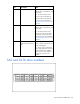
SAS and SATA drive numbers