
HP ProLiant DL320s Server Maintenance and Service Guide

Server component identification 39
Server component identification
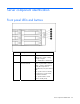
Front panel LEDs and buttons
Item Description Status
1 UID button/LED Blue = Identification is activated.
Flashing blue = System is being
remotely managed.
Off = Identification is deactivated.
2 Internal health LED Green = System health is normal.
Amber = System is degraded. To
identify the component in a
degraded state, see system board
LEDs.
Red = System critical. To identify
the component in a critical state,
see system board LEDs.
Off = System health is normal
(when in standby mode).