
HP ProLiant DL320s Server Maintenance and Service Guide

Removal and replacement procedures 31
6.
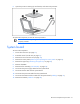
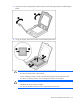
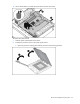
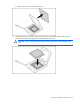
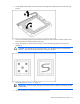
Open the processor retaining clip and bracket, and remove the processor.
To replace the component, reverse the removal procedure.
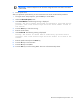
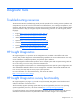
IMPORTANT: When replacing the heatsink, check the label on top to be sure the heatsink is
properly oriented.
System board
To remove the component:
1. Power down the server (on page 21).
2. Extend the server from the rack (on page 21).
3. Remove the server from the rack (on page 22).
4. Remove the access panel ("Removing and replacing the access panel" on page 22).
5. Remove the upper tray ("Removing the upper tray" on page 22).
6. Remove all DIMMs.
7. Remove the fan assembly ("Fan assembly" on page 24).
8. Disconnect the power supply cables from the system board.
9. Disconnect the fan cable from the system board.
10. Disconnect the power UID cable from the system board.
11. Disconnect the SATA hard drive cables from the system board ("Cabling" on page 51).
12. Remove the heatsink ("Heatsink" on page 28).