
HP ProLiant DL320s Server Maintenance and Service Guide

Removal and replacement procedures 29
CAUTION: Heatsink retaining screws should be tightened or loosened in diagonally opposite
pairs (in an "X" pattern). Do not overtighten the screws as this can damage the board,
connectors, or screws. Use the wrench supplied with the system to reduce the possibility of
overtightening the screws.
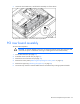
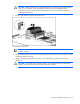
6. Pull up on the heatsink to remove it from the server.
To replace the component:
IMPORTANT: When replacing the heatsink, check the label on top to be sure the heatsink is
properly oriented.
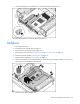
1. Use the alcohol swab to remove all the existing thermal grease from the processor. Allow the alcohol
to evaporate before continuing.
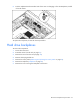
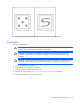
2. Apply new grease to the top of the processor in one of the following patterns to ensure even
distribution.
CAUTION: The heatsink thermal interface media is not reusable and must be replaced if the
heatsink is removed from the processor after it has been installed.