
HP ProLiant DL320s Server Maintenance and Service Guide

Removal and replacement procedures 26
7.
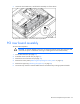
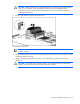
Loosen the thumbscrews, and lift the PCI riser board assembly out of the server.
To replace the component, reverse the removal procedure.
Midplane
1. Power down the server.
2. Extend the server from the rack (on page 21).
3. Remove the server from the rack (on page 22).
4. Remove the access panel ("Removing and replacing the access panel" on page 22).
5. Remove the power supplies ("Power supply" on page 23).
6. Remove the fan assembly ("Fan assembly" on page 24).
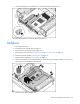
7. Lift the release button on the system board tray, and slide the tray out approximately 2.5 cm (1 in) to
allow space for the midplane to be removed.
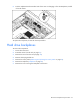
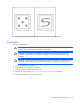
8. Loosen the two captive thumbscrews.