
ProLiant DL320 Generation 3 Server User Guide
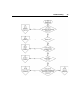
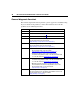
Table Of Contents
- HP ProLiant DL320 Generation 3 Server User Guide
- Notice
- Contents
- Server component identification
- Server operations
- Powering up the server
- Powering down the server
- Preparation procedures
- Extending the server from the rack
- Removing the access panel
- Installing the access panel
- Removing the PCI riser board assembly
- Installing PCI riser board assembly
- Removing the hot-plug SATA backplane
- Removing the fan assembly
- Installing the fan assembly
- Server setup
- Hardware options installation
- Server cabling
- Server software and configuration utilities
- Battery replacement
- Troubleshooting
- Electrostatic discharge
- Regulatory compliance notices
- Regulatory compliance identification numbers
- Federal Communications Commission notice
- Declaration of conformity for products marked with the FCC logo, United States only
- Modifications
- Cables
- Mouse compliance statement
- Canadian notice (Avis Canadien)
- European Union regulatory notice
- Japanese notice
- BSMI notice
- Korean notice A&B
- Laser compliance
- Battery replacement notice
- Taiwan battery recycling notice
- Power cord statement for Japan
- Server specifications
- Technical support
- Acronyms and abbreviations
- Index
80 HP ProLiant DL320 Generation 3 Server User Guide
General diagnosis flowchart
The General diagnosis flowchart provides a generic approach to troubleshooting.
If you are unsure of the problem, or if the other flowcharts do not fix the
problem, use the following flowchart.
Item Refer to
1 "Symptom Information (on page 76)"
2 "Loose Connections (on page 77)"
3 "Service Notifications (on page 77)"
4 Server maintenance and service guide, located on the
Documentation CD or the HP website
(http://www.hp.com/products/servers/platforms
)
5 Server user guide or setup and installation guide, located on
the Documentation CD or the HP website
(http://www.hp.com/products/servers/platforms
)
6 • Server maintenance and service guide, located on the
Documentation CD or the HP website
(http://www.hp.com/products/servers/platforms
)
• "Hardware Problems" in the HP ProLiant Servers
Troubleshooting Guide located on the Documentation CD
or on the HP website (http://www.hp.com/support
).
7 • "Server Information You Need" in the HP ProLiant Servers
Troubleshooting Guide located on the Documentation CD
or on the HP website (http://www.hp.com/support
).
• "Operating System Information You Need" in the HP
ProLiant Servers Troubleshooting Guide located on the
Documentation CD or on the HP website
(http://www.hp.com/support
).
8 "Contacting HP Technical Support or an Authorized Reseller" in
the HP ProLiant Servers Troubleshooting Guide located on the
Documentation CD or on the HP website
(http://www.hp.com/support
).