
ProLiant DL320 Generation 3 Server User Guide
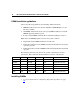
Table Of Contents
- HP ProLiant DL320 Generation 3 Server User Guide
- Notice
- Contents
- Server component identification
- Server operations
- Powering up the server
- Powering down the server
- Preparation procedures
- Extending the server from the rack
- Removing the access panel
- Installing the access panel
- Removing the PCI riser board assembly
- Installing PCI riser board assembly
- Removing the hot-plug SATA backplane
- Removing the fan assembly
- Installing the fan assembly
- Server setup
- Hardware options installation
- Server cabling
- Server software and configuration utilities
- Battery replacement
- Troubleshooting
- Electrostatic discharge
- Regulatory compliance notices
- Regulatory compliance identification numbers
- Federal Communications Commission notice
- Declaration of conformity for products marked with the FCC logo, United States only
- Modifications
- Cables
- Mouse compliance statement
- Canadian notice (Avis Canadien)
- European Union regulatory notice
- Japanese notice
- BSMI notice
- Korean notice A&B
- Laser compliance
- Battery replacement notice
- Taiwan battery recycling notice
- Power cord statement for Japan
- Server specifications
- Technical support
- Acronyms and abbreviations
- Index
38 HP ProLiant DL320 Generation 3 Server User Guide
DIMM installation guidelines
Observe the following guidelines when installing additional memory:
• DIMMs installed in the server must be Unbuffered DDR DRAM, 2.5 V, 64
bits wide, and ECC.
• All DIMMs installed must be the same speed (DDR PC3200). Do not install
DIMMs supporting different speeds.
• If only a single DIMM is installed, HP recommends installing it in slot 1A.
BIOS detects the DIMM population and sets the system as follows:
• Single-bank mode: DIMMs installed in one bank only.
• Dual-bank asymmetric mode: DIMMs installed in both banks, but of unequal
capacities per bank.
• Dual-bank interleaved mode: DIMMs installed in both banks with equal bank
capacities.
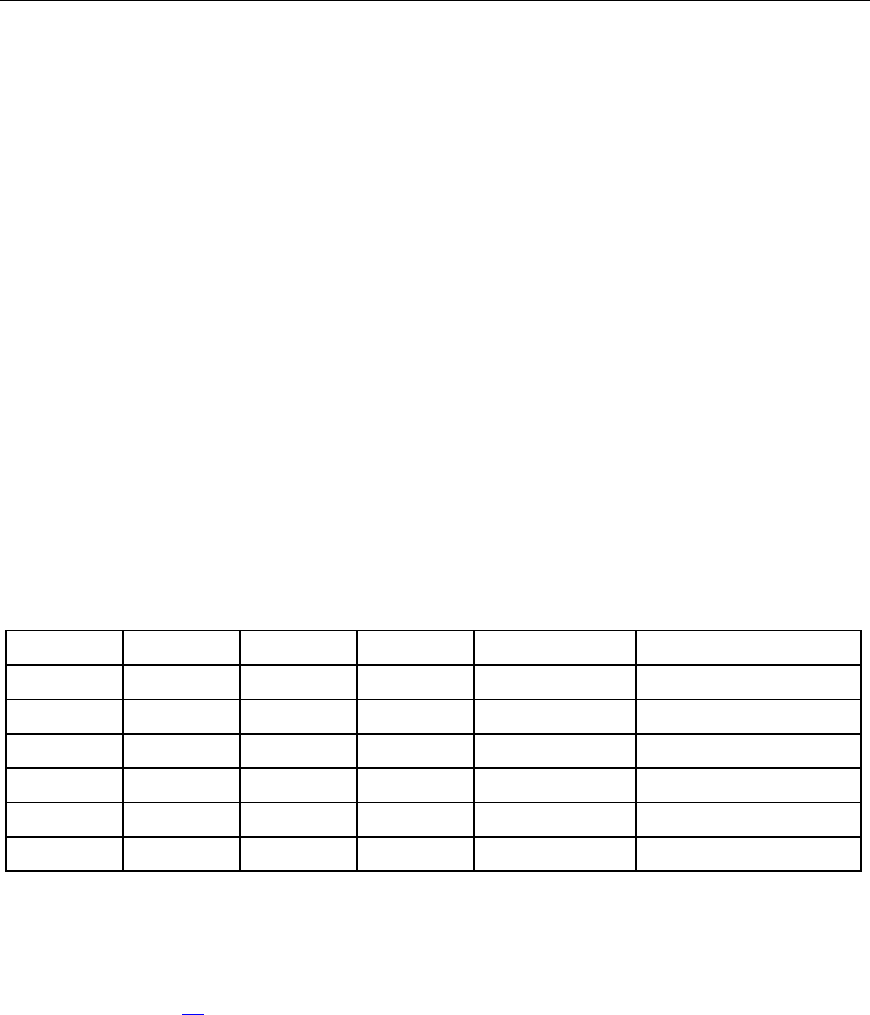
The following table lists some, but not all, possible configurations. For best
performance, HP recommends dual-bank interleaved mode configurations.
Slot 1A Slot 2A Slot 3B Slot 4B Total Memory Mode
512 MB — — — 512 MB Single-bank
512 MB — 512 MB — 1 GB Dual-bank interleaved
1 GB — — — 1 GB Single-bank
1 GB — 1 GB — 2 GB Dual-bank interleaved
1 GB 1 GB 1 GB — 3 GB Dual-bank asymmetric
1 GB 1 GB 1 GB 1 GB 4 GB Dual-bank interleaved
Installing DIMMs
1. Access the internal server components ("Preparation procedures" on page
20
).