
ProLiant DL320 Generation 3 Server User Guide
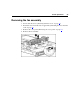
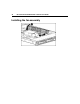
Table Of Contents
- HP ProLiant DL320 Generation 3 Server User Guide
- Notice
- Contents
- Server component identification
- Server operations
- Powering up the server
- Powering down the server
- Preparation procedures
- Extending the server from the rack
- Removing the access panel
- Installing the access panel
- Removing the PCI riser board assembly
- Installing PCI riser board assembly
- Removing the hot-plug SATA backplane
- Removing the fan assembly
- Installing the fan assembly
- Server setup
- Hardware options installation
- Server cabling
- Server software and configuration utilities
- Battery replacement
- Troubleshooting
- Electrostatic discharge
- Regulatory compliance notices
- Regulatory compliance identification numbers
- Federal Communications Commission notice
- Declaration of conformity for products marked with the FCC logo, United States only
- Modifications
- Cables
- Mouse compliance statement
- Canadian notice (Avis Canadien)
- European Union regulatory notice
- Japanese notice
- BSMI notice
- Korean notice A&B
- Laser compliance
- Battery replacement notice
- Taiwan battery recycling notice
- Power cord statement for Japan
- Server specifications
- Technical support
- Acronyms and abbreviations
- Index

Server setup 29
Optimum environment
When installing the server in a rack, select a location that meets the
environmental standards described in this section.
Space and airflow requirements
To allow for servicing and adequate airflow, observe the following space and
airflow requirements when deciding where to install a rack:
• Leave a minimum clearance of 122 cm (48 in) in front of the rack.
• Leave a minimum clearance of 76.2 cm (30 in) behind the rack.
• Leave a minimum clearance of 122 cm (48 in) from the back of the rack to
the back of another rack when racks are back-to-back.
HP servers draw in cool air through the front door and expel warm air through
the rear door. Therefore, the front and rear rack doors must be adequately
ventilated to allow ambient room air to enter the cabinet, and the rear door must
be adequately ventilated to allow the warm air to escape from the cabinet.
CAUTION: To prevent improper cooling and damage to the
equipment, do not block the ventilation openings.
When vertical space in the rack is not filled by a server or rack component, the
gaps between the components cause changes in airflow through the rack and
across the servers. Cover all gaps with blanking panels to maintain proper
airflow.
CAUTION: Always use blanking panels to fill empty vertical
spaces in the rack. This arrangement ensures proper airflow. Using a
rack without blanking panels results in improper cooling that can lead to
thermal damage.
The Compaq 9000 and 10000 Series racks provide proper server cooling from
flow-through perforations in the front and rear doors that provide 64 percent
open area for ventilation.