
ProLiant DL320 Generation 3 Server User Guide
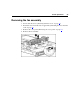
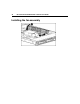
Table Of Contents
- HP ProLiant DL320 Generation 3 Server User Guide
- Notice
- Contents
- Server component identification
- Server operations
- Powering up the server
- Powering down the server
- Preparation procedures
- Extending the server from the rack
- Removing the access panel
- Installing the access panel
- Removing the PCI riser board assembly
- Installing PCI riser board assembly
- Removing the hot-plug SATA backplane
- Removing the fan assembly
- Installing the fan assembly
- Server setup
- Hardware options installation
- Server cabling
- Server software and configuration utilities
- Battery replacement
- Troubleshooting
- Electrostatic discharge
- Regulatory compliance notices
- Regulatory compliance identification numbers
- Federal Communications Commission notice
- Declaration of conformity for products marked with the FCC logo, United States only
- Modifications
- Cables
- Mouse compliance statement
- Canadian notice (Avis Canadien)
- European Union regulatory notice
- Japanese notice
- BSMI notice
- Korean notice A&B
- Laser compliance
- Battery replacement notice
- Taiwan battery recycling notice
- Power cord statement for Japan
- Server specifications
- Technical support
- Acronyms and abbreviations
- Index

27
Server setup
In this section
Optional installation services........................................................................................................27
Rack planning resources...............................................................................................................28
Optimum environment..................................................................................................................29
Rack warnings ..............................................................................................................................32
Identifying the server shipping carton contents............................................................................33
Installing hardware options ..........................................................................................................33
Installing the server into the rack .................................................................................................34
Powering up and configuring the server.......................................................................................35
Installing the operating system.....................................................................................................35
Registering the server ...................................................................................................................36
Optional installation services
Delivered by experienced, certified engineers, HP Care Pack services help you
keep your servers up and running with support packages tailored specifically for
HP ProLiant systems. HP Care Packs let you integrate both hardware and
software support into a single package. A number of service level options are
available to meet your needs.
HP Care Pack Services offer upgraded service levels to expand your standard
product warranty with easy-to-buy, easy-to-use support packages that help you
make the most of your server investments. Some of the Care Pack services are:
• Hardware support
– 6-Hour Call-to-Repair
– 4-Hour 24x7 Same Day
– 4-Hour Same Business Day
• Software support
– Microsoft®
– Linux