
ProLiant DL320 Generation 3 Server User Guide
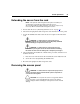
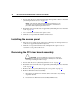
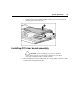
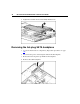
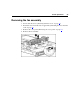
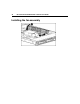
Table Of Contents
- HP ProLiant DL320 Generation 3 Server User Guide
- Notice
- Contents
- Server component identification
- Server operations
- Powering up the server
- Powering down the server
- Preparation procedures
- Extending the server from the rack
- Removing the access panel
- Installing the access panel
- Removing the PCI riser board assembly
- Installing PCI riser board assembly
- Removing the hot-plug SATA backplane
- Removing the fan assembly
- Installing the fan assembly
- Server setup
- Hardware options installation
- Server cabling
- Server software and configuration utilities
- Battery replacement
- Troubleshooting
- Electrostatic discharge
- Regulatory compliance notices
- Regulatory compliance identification numbers
- Federal Communications Commission notice
- Declaration of conformity for products marked with the FCC logo, United States only
- Modifications
- Cables
- Mouse compliance statement
- Canadian notice (Avis Canadien)
- European Union regulatory notice
- Japanese notice
- BSMI notice
- Korean notice A&B
- Laser compliance
- Battery replacement notice
- Taiwan battery recycling notice
- Power cord statement for Japan
- Server specifications
- Technical support
- Acronyms and abbreviations
- Index
Server operations 21
Extending the server from the rack
NOTE: If the optional cable management arm option is installed, you
can extend the server without powering down the server or
disconnecting peripheral cables and power cords. These steps are only
necessary with the standard cable management solution.
1. Power down the server ("Powering down the server" on page 19).
2. Disconnect all peripheral cables and power cords from the server rear panel.
3. Loosen the thumbscrews that secure the server faceplate to the front of the
rack.
WARNING: To reduce the risk of personal injury or
equipment damage, be sure that the rack is adequately stabilized
before extending a component from the rack.
WARNING: To reduce the risk of personal injury, be
careful when pressing the server rail-release latches and sliding
the server into the rack. The sliding rails could pinch your fingers.
4. After performing the installation or maintenance procedure, slide the server
back into the rack:
a. Press the server rail-release latches and slide the server fully into rack.
b. Secure the server by tightening the thumbscrews.
5. Reconnect the peripheral cables and power cords.
Removing the access panel
WARNING: To reduce the risk of personal injury from hot
surfaces, allow the drives and the internal system components to
cool before touching them.
CAUTION: Do not operate the server for long periods with the
access panel open or removed. Operating the server in this manner
results in improper airflow and improper cooling that can lead to thermal
damage.