
ProLiant DL320 Generation 3 Server User Guide
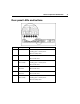
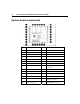
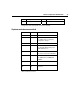
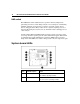
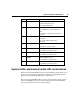
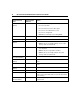
Table Of Contents
- HP ProLiant DL320 Generation 3 Server User Guide
- Notice
- Contents
- Server component identification
- Server operations
- Powering up the server
- Powering down the server
- Preparation procedures
- Extending the server from the rack
- Removing the access panel
- Installing the access panel
- Removing the PCI riser board assembly
- Installing PCI riser board assembly
- Removing the hot-plug SATA backplane
- Removing the fan assembly
- Installing the fan assembly
- Server setup
- Hardware options installation
- Server cabling
- Server software and configuration utilities
- Battery replacement
- Troubleshooting
- Electrostatic discharge
- Regulatory compliance notices
- Regulatory compliance identification numbers
- Federal Communications Commission notice
- Declaration of conformity for products marked with the FCC logo, United States only
- Modifications
- Cables
- Mouse compliance statement
- Canadian notice (Avis Canadien)
- European Union regulatory notice
- Japanese notice
- BSMI notice
- Korean notice A&B
- Laser compliance
- Battery replacement notice
- Taiwan battery recycling notice
- Power cord statement for Japan
- Server specifications
- Technical support
- Acronyms and abbreviations
- Index
Server component identification 15
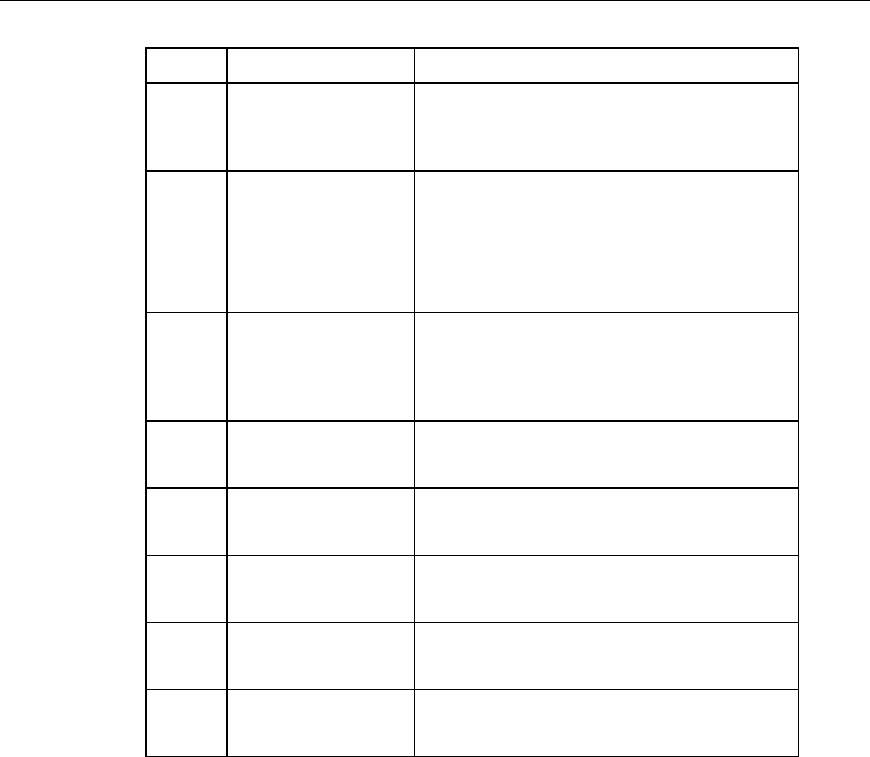
Item LED Description Status
3 Overtemperature Amber = System has reached a cautionary
or critical temperature level.
Off = Temperature is OK.
4 System fan module Amber = One fan in this module has failed.
Red = Multiple fans in this module have
failed.
Off = All fans in this module are operating
normally.
5 Power supply signal Amber = Power supply signal cable is not
connected.
Off = Power supply signal cable is
connected.
6 PCI Riser interlock Amber = PCI riser cage not seated.
Off = PCI riser cage is seated.
7 DIMM 1 Amber = DIMM has failed.
Off = DIMM is operating normally.
8 DIMM 2 Amber = DIMM has failed.
Off = DIMM is operating normally.
9 DIMM 3 Amber = DIMM has failed.
Off = DIMM is operating normally.
10 DIMM 4 Amber = DIMM has failed.
Off = DIMM is operating normally.
System LEDs and internal health LED combinations
When the internal health LED on the front panel illuminates either amber or red,
the server is experiencing a health event. Combinations of illuminated system
LEDs and the internal health LED indicate system status.
The front panel health LEDs indicate only the current hardware status. In some
situations, HP SIM may report server status differently than the health LEDs
because the software tracks more system attributes.