
ProLiant DL320 Generation 3 Server User Guide

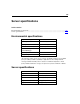
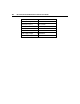
Table Of Contents
- HP ProLiant DL320 Generation 3 Server User Guide
- Notice
- Contents
- Server component identification
- Server operations
- Powering up the server
- Powering down the server
- Preparation procedures
- Extending the server from the rack
- Removing the access panel
- Installing the access panel
- Removing the PCI riser board assembly
- Installing PCI riser board assembly
- Removing the hot-plug SATA backplane
- Removing the fan assembly
- Installing the fan assembly
- Server setup
- Hardware options installation
- Server cabling
- Server software and configuration utilities
- Battery replacement
- Troubleshooting
- Electrostatic discharge
- Regulatory compliance notices
- Regulatory compliance identification numbers
- Federal Communications Commission notice
- Declaration of conformity for products marked with the FCC logo, United States only
- Modifications
- Cables
- Mouse compliance statement
- Canadian notice (Avis Canadien)
- European Union regulatory notice
- Japanese notice
- BSMI notice
- Korean notice A&B
- Laser compliance
- Battery replacement notice
- Taiwan battery recycling notice
- Power cord statement for Japan
- Server specifications
- Technical support
- Acronyms and abbreviations
- Index

110 HP ProLiant DL320 Generation 3 Server User Guide
Customer self repair
What is customer self repair?
HP's customer self-repair program offers you the fastest service under either
warranty or contract. It enables HP to ship replacement parts directly to you so
that you can replace them. Using this program, you can replace parts at your own
convenience.
A convenient, easy-to-use program:
• An HP support specialist will diagnose and assess whether a replacement
part is required to address a system problem. The specialist will also
determine whether you can replace the part.
• For specific information about customer replaceable parts, refer to the
maintenance and service guide on the HP website
(http://www.hp.com/support
).