
HP ProLiant DL320 Generation 2 Server Setup and Installation Guide


Installing Hardware Options
3. Remove the center wall. Refer to step 4 in the “Installing ATA Hard Drives”
section earlier in this chapter.
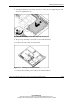
4. Remove the ATA cable from the system board and store for later use. Refer to
Figure 3-21.
5. Remove the ATA hard drives if necessary.
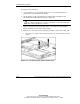
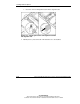
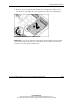
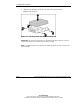
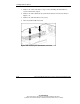
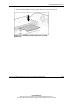
6. Insert the SCSI module stand-offs.
Figure 3-22: Inserting the SCSI Module stand-offs
3-28 HP ProLiant DL320 Generation 2 Server Setup and Installation Guide
HP CONFIDENTIAL
Writer: Anna Roberts File Name: d-ch3 Installing Hardware Options.doc
Codename: MoonStar Part Number: 293166-002 Last Saved On: 1/31/03 11:16 AM