
HP ProLiant DL320 Generation 2 Server Setup and Installation Guide
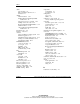
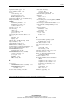
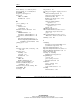
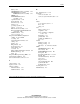
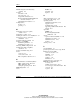
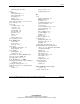

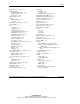
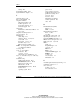

Index
settings E-8
power D-6
System Erase Utility D-11
power cycling D-2, D-9
System Firmware Update 5-8
problems after startup D-9
problems at startup D-2
processor D-6
T
resources D-13
technical support xiii
SmartStart D-10, D-11
Telco racks, stability 2-6
software problems D-9
telephone numbers
video D-7
authorized resellers xiii
for FCC questions A-3
U
for product questions A-3
Unit Identification (UID)
technical support xiii
button 3-6
temperature
LEDs 3-3, E-2
maximum recommended ambient 2-4
unit identification switches
server F-2
front 3-3, E-7
template, measuring with 4-2
rear E-5
text conventions xii
unlocking the center wall 3-21
thumbscrews
unpacking the rack server 2-7
cable clamp 4-13
upgrading DIMM option kits 3-8
cable tray, fixed 3-4, 4-5, 4-8
UPS for server data protection 2-7
center wall 3-21
USB connectors 3-6, 4-10
front panel 3-5, 4-1, 4-7
utilities
hard drive trays 3-23
ASR 5-7
PCI riser board assembly 3-9
Insight Manager 5-6
TMRA See temperature, maximum
recommended ambient
overview 5-1
POST 5-7
toe straps B-2
RBSU 5-1
tools See also utilities
redundant ROM support 5-1
conductive B-2
ROMPaq 5-3
overview 1-1, 5-1
security 1-2
rack model server installation 2-7
server features 1-1
trays See hard drive trays. See cable tray,
fixed
SmartStart 5-4
troubleshooting
additional information D-13
V
CD-ROM/diskette drive D-10
vanadium pentoxide battery warning A-7
diagnosis procedure D-4
ventilation, rack door 2-3
diskette drive D-10
video connector
DVD-ROM/diskette drive D-10
locating 3-6, 4-9
monitor D-5
size restrictions 4-11
operating system D-11
Index-10 HP ProLiant DL320 Generation 2 Server Setup and Installation Guide
HP CONFIDENTIAL
Writer: Richard O. Heath File Name: x-index.doc
Codename: MoonStar Part Number: 293166-001 Last Saved On: 1/31/03 11:27 AM