
HP ProLiant DL185 Generation 5 Server Software Configuration Guide



System BIOS configuration 31
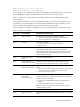
Error message 1 of 1: Error code 0103
Keyboard not detected - Keyboard error
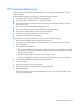
In some cases an error message may include recommendations for troubleshooting or require that you
press the Enter key to display recommendations. Follow the instructions on the screen.
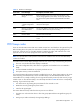
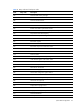
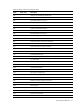
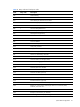
Table 21 lists the most common POST error messages with their corresponding troubleshooting
recommendation.
It is recommended that you correct the error before proceeding, even if the server appears to boot
successfully. If your system displays one of the messages marked below with an asterisk (*), write
down the code and message and contact your HP Customer Support provider.
When no POST error message is displayed but the server stops during POST, listen for beep codes.
Table 21 POST Error Messages
Error code
Error message
Description/corrective action
0200 Failure Fixed Disk Fixed disk is not working or not configured properly.
1 Run Setup and check if the fixed-disk type is correctly identified.
2 Check to see if fixed disk is attached properly.
0210 Stuck key Stuck key on keyboard.
1
Locate the stuck key on your keyboard and release it.
2
Reboot the server.
0211 Keyboard error Keyboard not working.
Verify that the keyboard cable is securely connected to the
keyboard port (not the mouse port) on the rear panel of the server.
If the problem persists, replace the keyboard or contact your HP
Customer Support provider.
0212 Keyboard Controller
Failed
Keyboard controller failed test.
0220 Monitor type does not
match CMOS - Run SETUP
The attached monitor cannot be correctly identified by Setup.
Run Setup and check if the monitor type is correctly identified.
0250 System battery is dead -
Replace and run SETUP
The CMOS clock battery indicator shows the system battery is
dead.
1
Replace the system battery following the procedures in the HP ProLiant
DL185 Generation 5 Server Maintenance and Service Guide.
2
Run Setup to reconfigure the system.
0251 System CMOS checksum
bad - Default
configuration used
The settings in the Setup Utility have been corrupted or modified
incorrectly, perhaps by an application program that changes data
stored in CMOS. You can either:
•
Load the system default values following the procedures on
page 31.
•
Access Setup and enter your own custom values.
If the error persists, check the system battery or contact your HP
Customer Support provider.
0260 System timer error The timer test failed. Requires repair of the system board.
0270 Real time clock error Real-Time Clock (RTC) fails BIOS hardware test. May require board
repair.