
HP ProLiant DL185 Generation 5 Server Software Configuration Guide

System BIOS configuration 28
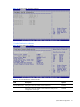
Exit menu
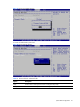
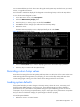
The Exit menu displays several options for how to quit the Setup Utility. Select any of the exit options
and press Enter.
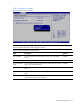
Figure 29 Exit menu
Table 20 Exit menu fields
Option
Description
Save Changes and Exit Save the changes made and exit the Setup Utility
Discard Changes and
Exit
Discard the changes and exit the Setup utility
Discard Changes Discard any changes made thus far in the Setup utility.
Load Option Default Loads the default settings for all BIOS setup fields.
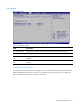
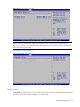
BIOS Summary Display screen
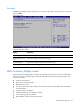
The BIOS Summary Displays basic and important information about the current server configuration
and is necessary for troubleshooting and may be required when asking for technical support. This
information includes:
• Processor specifications
• BIOS version and release date
• BMC firmware version
• Size of the system and video memory, as well as the memory size allotted for the cache RAM
and option ROM
• Serial port base I/O address
• Available hard drives and expansion boards
• Server asset tag and serial number
• MAC address of each of the three LAN ports