
HP ProLiant DL185 Generation 5 Server Software Configuration Guide



System BIOS configuration 10
Table
3
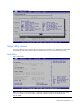
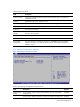
Boot Settings Configuration submenu fields
Field
Description
Options
Bootup Num-
Lock
Set this value to allow Num Lock on the keyboard to be enabled
automatically when the computer system is booted up. This allows the
immediate use of the numeric keypad located on the right side of the
keyboard. To confirm this, the Num Lock LED on the keyboard ill be lit.
Enabled
This option does not enable the keyboard Num Lock automatically. To use
the numeric keypad, press the Num Lock key located on the upper left-hand
corner of the numeric keypad. The Num Lock LED on the keyboard will light
up when Num lock is engaged. This is the default setting.
Disabled
Restore on AC
Power Loss
Set this value to restores previous power state before loss occurred. Last State
Set this value always boot when AC power is restored. Power on
Set this value keep power off until the power button is pressed. Stay Off
POST F1 Prompt Set this value to allow wait up to 15 seconds for press F1. Delayed
Set this value to allow wait indefinitely for press F1. Enabled
Set this value to not wait for F1, but simply continues booting. Disabled
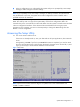
Advanced menu
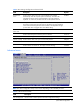
Figure 5 Advanced menu
NOTE: The CPU Configuration setup screen varies depending on the installed processor.
Table
4
Advanced menu fields
Field Description
CPU Configuration Use this screen to select options for the CPU Configuration Settings.