
HP ProLiant DL185 Generation 5 Server Maintenance and Service Guide
Table Of Contents
- HP ProLiant DL185 Generation 5 Server Maintenance and Service Guide
- Notice
- Contents
- Customer self repair
- Illustrated parts catalog
- Removal and Replacement Procedures
- Connectors, Switches, and LEDs
- Diagnostic tools and Setup Utilities
- Physical and Operating Specifications
- Index
Contents 69
Connectors, Switches, and LEDs
This chapter contains illustrations and tables identifying and describing the connectors, switches,
buttons, and LED indicators located on the front panel, rear panel, system board and hard drives of
the HP ProLiant DL185 G5 server.
Connectors and Components
Front Panel Components
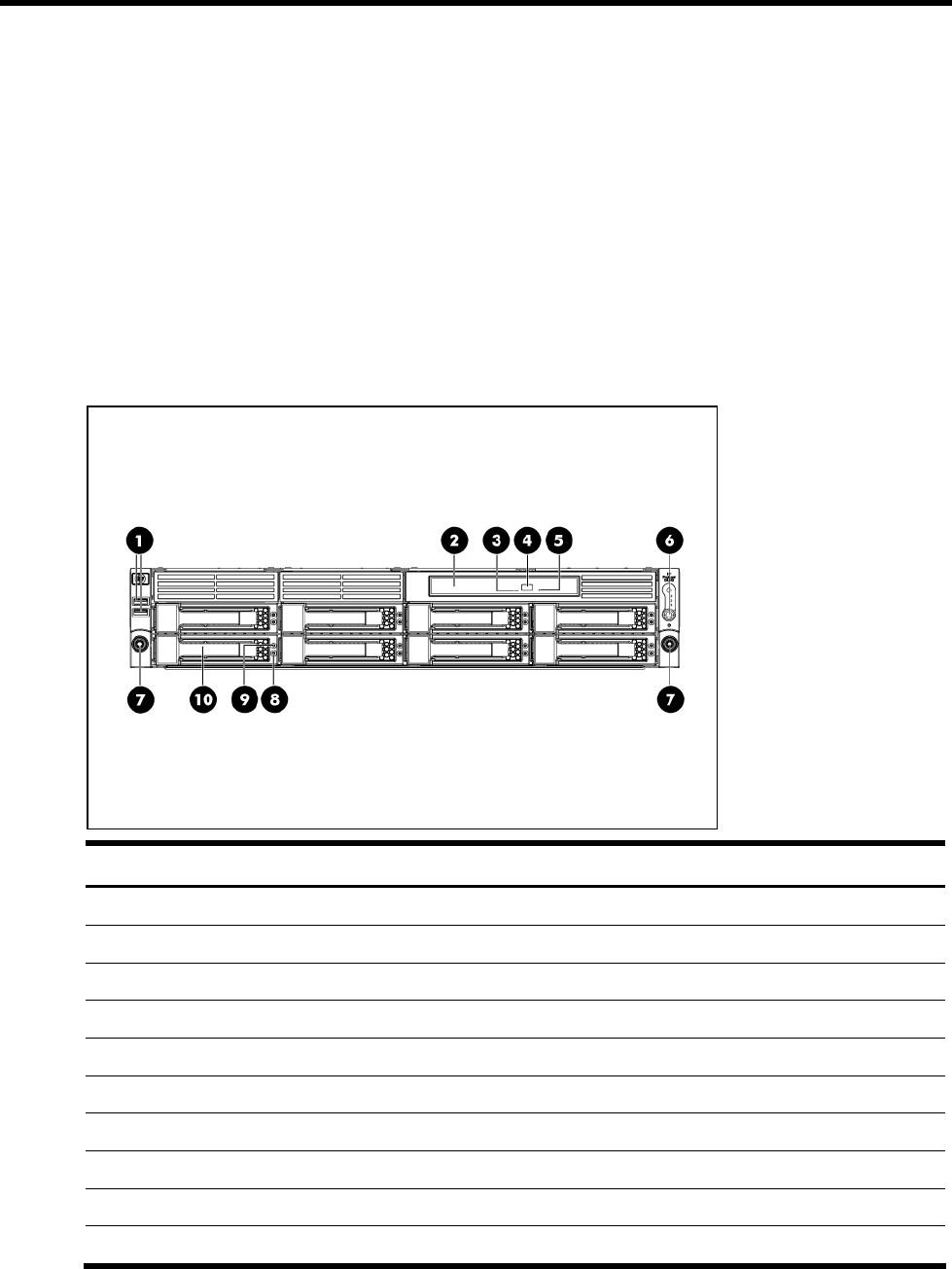
Figure 65 Front Panel Components for 8 HDD Server
Item Description
1 Two Front USB 2.0 Ports
2 Optical Disc Drive (optional)
3 Optical Disc Drive Activity Indicator
4 Optical drive eject button
5 Optical Drive Manual Ejection Hole
6 Power button, Health/UID LED, NIC 1/2 Activity
7 Rack thumbscrews
8 Drive Activity LED
9 Drive Online/Error LED
10 Hard Disk Drive (HDD) Bay